

Pets + Retirees… They Go Together!
 Happy Valentine’s Day to all of my readers. I could not think of a better way to “celebrate” our appreciation of “heart-day” with reflections on what our pets bring us… adulation, affection, attachment, companionship, devotion, enjoyment, good will, involvement, passion, stimulation, tenderness, understanding…
“The power of love!” They say that all you have to do is look at the face of a sleeping baby, or cuddle up next to a puppy or kitten, and it will slow down your respiration rate, lower your blood pressure, reduce cholesterol and triglycerides in your blood, and increase in your body the levels of serotonin and dopamine, two neurochemicals that play big roles in the promoting feelings of calm and well-being.

From personal experience, having two of the most adorable and loving dogs… If you’re contemplating retirement and you have never owned a pet, let me be the first to tell you:
“Pets can change your life.”
I invite you to peruse several other blogs I’ve written on this subject:
If you are almost ready to retire, or you’re going through your first couple years of your post-employment “internship,” there’s a good chance that psychologically it would be good for you to “get out of Dodge” as you adjust to your new status. This might be a good time for you to take a cruise, tour Europe, go ice fishing up north, or plan a long road trip out west. Pack up everything and takeoff. Celebrate all those years that you put your nose to the grind stone.
But eventually, you may want to come back “to nest,” and “taste” a little transitioning into things that seem to go well together, e.g. small doses of (human) babysitting, grandparent/child interaction, and/or rescuing a pet. Becoming a homebody may also suggest the consideration of planning small or large renovation projects: fix up your garden or backyard, design your ideal kitchen, remodel the bathrooms, do a garage remake, downsize and de-clutter, etc. After the first several years of simply resting and exploring the options of your self-reinvention, NOW might be the perfect moment to add a furry friend to your family!

Why get a pet?
Goodnet (“Gateway to Doing Good”) summarizes nine reasons you should adopt a pet:
- Pets have their perks when it comes to your health. (More on that later.)
- A pet will love you unconditionally. (Thus the title of this blog!)
- Adopting a pet is easy on your wallet. (Pet rescue from a shelter is less expensive.)
- Adopting a pet means saving a life. (Millions of animals are euthanized per year.)
- By adopting a pet, you’re giving an animal a second chance. (Another go at life!)
- Pets keep you active. (Dog walking provides owner aerobic exercise.)
- Pets bring joy and fulfillment. (Pet care enhances a sense of purpose for retirees.)
 Pets boost your social life. (Research indicates pets decrease social isolation.)
- Besides, how could you possibly resist this face?
Medical benefits including psychological health
There’s an avalanche of online research that backs up claims that pet ownership is actually “good for you!”
Pet owners know how much their furry friend improves their quality of life. But it’s not all about unconditional love—although that actually provides a wellness boost, too. On an emotional level, owning a pet can decrease depression, stress and anxiety; health-wise, it can lower your blood pressure, improve your immunity, and even decrease your risk of heart attack and stroke.
— Alexandra Gekas

Here are my “top dozen” reasons and resources to peruse:
- Having a pet decreases stress: Promises Treatment Centers
- Caring for a pet lowers your blood pressure: WebMD
- Owning a dog reduces cholesterol and triglyceride levels: Harvard
- Pets keep you fit and active: Gerontologist
- Daily dog walking helps you to lose weight: Healthy People
- Owning a dog can help detect, treat, and manage disease and injuries: HuffPost
- Pet therapy eases pain management and reduces anxiety: Loyola University
- Pets may reduce doctor’s visits: American Psychological Association PsycNet
- Having a dog may make you (at least feel) safer: LifeHack
- Pets help you build friendships and find social support: Harvard
- Dog owners are less prone to depression: GrandParents.com
- Pet ownership adds meaning and purpose: BestFriends
Believe it or not, pets can be the best medicine, especially when a person is dealing with chronic pain such as migraines or arthritis. Just like Valium, it reduces anxiety. The less anxiety, the less pain…
People who have pets are less harried; there’s more laughter in their life. When you come home, it’s like you’re George Clooney. You’re a star. This is a primary reason pets are used in various forms of therapy.
If you have a dog around, your blood pressure is lower. A lot of it goes back to reducing stress: You might lose your job, your house, your 401(k)—but you’ll never lose the unconditional love of your pet.
— Dr. Marty Becker, DVM, veterinary consultant for Good Morning America and author of the book Your Dog: The Owner’s Manual.

Increasing your regular habits of exercise
The experts say that physical activity promotes flexibility, muscle strength, stamina, and balance, and helps us to remain mobile into our 70s and 80s. Caring for a pet may help! For example, studies from the National Center for Biotechnology of the U.S. National Library of Medicine (like this one) indicate that older adults who walked dogs with frequent moderate to vigorous exercise are associated with lower body mass index and faced fewer limitations to their daily living activities.
Having trouble sticking to an exercise program? Research shows that dogs are actually Nature’s perfect personal trainers—loyal, hardworking, energetic and enthusiastic. And, unlike your friends, who may skip an exercise session because of appointments, extra chores or bad weather, dogs never give you an excuse to forego exercising.
In 2008, the U.S. Department of Labor reported that only 16 percent of Americans ages 15 and older exercised at all on an average day! This is where your canine personal trainer can help.
—Dawn Marcus
 How much exercise is enough? Well, according to the World Health Organization, the “best practices” of a good health and wellness program includes:
- 60 minutes of moderate to vigorous activity daily for children 5 to 17 years old
- 30 minutes of moderate-intensity exercise five days per week for adults 18 to 65 years old, plus strengthening exercises two days per week
- 30 minutes of moderate-intensity exercise five days per week, with modifications as needed in seniors over 65 years old, plus flexibility and balance exercises.
The good news? From Bark, “Researchers at the University of Western Australia found that seven in every 10 adult dog owners achieved 150 minutes of physical exercise per week, compared with only four in every 10 non-owners.” We already know that grabbing that leash, whistling for the pup, going for a brisk walk, and getting out to see what’s going on in your neighborhood, may help to reduce stress, depression, lethargy, the risks of obesity, and many other medical problems.

The all-essential quest for “mattering” and “feeling needed”
In the past blog “Retiree Concepts,” I mentioned the book, Revitalizing Retirement: Reshaping Your Identity, Relationships, and Purpose by Nancy Schlossberg (definitely an excellent buy), and reviewed the issues of “marginality” (bad) and “mattering” (good). The essential question is worth repeating here: “Do you feel “needed” and that you “make a difference” to others?”
Caring for a pet does a great job of fulfilling our need to find in our retired lives the “purpose, community, and structure” referred to Ernie Zelinski in his book, How to Retire Happy, Wild and Free.
As we grow older—especially after we retire—it can be difficult to find structure and meaning day in and day out. Dogs take care of that.
— Kristen Sturt
They force people to continue to do things. So, even if you’re not feeling well emotionally or physically, the dog doesn’t care. I mean, they care, but they still want you to feed them and take them for a walk.”
— Kristi Littrell, Adoption Manager at Best Friends Animal Society in Utah
At Walter Reed Army Medical Center, they’re using dogs to help soldiers dealing with post-traumatic stress disorder. They’re finding the guys who have a pet are able to re-enter society a little bit easier. They’re showing a decreased suicide rate, one of the biggest health threats [veterans] face. These guys who have a pet have someone they’re responsible for, someone who cares about them. And they don’t have to explain what they’ve been through.
— Dr. Katy Nelson, associate emergency veterinarian at the VCA Alexandria Animal Hospital in Alexandria, Virginia
It’s not only about the tangibles – physical, medical, mental
It’s simple… every day, my pooches make me feel good!
Oh, we have all witnessed the “life-changing power of pets” (Psychology Today) and the tremendous social bond partnering a dog (or cat) with a human. We agree, “Pet owners have big hearts and bestow good feelings on both animals and people. Having a pet does not replace a human social network, but rather enhances and enlarges it. Cats, dogs, birds—and pets of all species, shapes, and sizes—bring wellness.”
 On personal observation, I can attest that walking my dogs in the neighborhood can be one of the most contemplative (almost meditative) experiences of the day. I commune with nature, let my imagination wander (dream “wide-awake”), notice things I have never before stopped to see, hear, or smell, and reflect on my life goals. I find the “pause” in my daily routine (or should I say “paws”) makes me feel refreshed, thoughtful, more calm, tolerant, and patient while at the same time more alert and focused, and always leaves me in a better mood.
Dr. John V. DiAscenzo, my talented friend and PMEA music education colleague with great background in research, would now demand of me, “Show me the specific studies that support your claim that walking dogs make people feel happy!” Got it! I found numerous references, including this article from the National Institutes of Health.


You can’t buy this kind of shared love… a snapshot
- No matter how good or bad my day is, the moment of my return to home, stepping into “puppy heaven,” Gracie and Brewster rushing up in full gallop to lick (kiss) and welcome me, jumping up as if to say, “Oh, we’re so glad he’s back!”
- The vigorous wagging of her tail and the “happy dance” Gracie does when I reach for her favorite bone
- The “nesting” impulse of Brewster as he paws his towel on top of our bed, just before he curls up in a small ball, leaning into the small of my back (giving me great lumbar support) and falling asleep
- Gracie pushing Brewster out of the way when jockeying position to receive pats on the head from a visitor
 Expert cuddlier Brewster flipping on his back so you rub his tummy, and when you are distracted, gently pawing at you begging you not to stop
- Gracie’s “happy barks” and squeals of excitement when mommy brings in the supper dish
- Gracie jumping up onto the extra desk chair to watch daddy type on his computer (we even had to buy her own chair)
- Brewster winning a contest for the most puppy-pushups (up/sit/down) in dog (people) training classes
- Having totally original “dog-o-nalities” and never failing to amaze me every day, being awakened by them at 6 a.m.
- But, after going out, all three of us climbing into the La-Z-Boy® combo recliners and falling back to sleep, Gracie between my legs with her chin on my ankle, and Brewster on my left shoulder like a violin shoulder pad
Lowering the numbers of neglected pets in overcrowded sanctuaries
Finally, although perhaps not the most significant rationale for a retiree to go rescue a pet, these are estimated animal shelter statistics from the ASPCA and the American Pet Products Association (source):
- Approximately 6.5 million companion animals enter U.S. animal shelters nationwide every year. Of those, approximately 3.3 million are dogs and 3.2 million are cats.
- Each year, approximately 1.5 million shelter animals are euthanized (670,000 dogs and 860,000 cats).
 Approximately 3.2 million shelter animals are adopted each year (1.6 million dogs and 1.6 million cats).
- About 710,000 animals who enter shelters as strays are returned to their owners. Of those, 620,000 are dogs and only 90,000 are cats.
- It’s estimated that 78 million dogs and 85.8 million cats are owned in the United States. Approximately 44% of all households in the United States have a dog, and 35% have a cat.
- According to the APPA, these are the most common sources from which primary methods cats and dogs are obtained as pets:
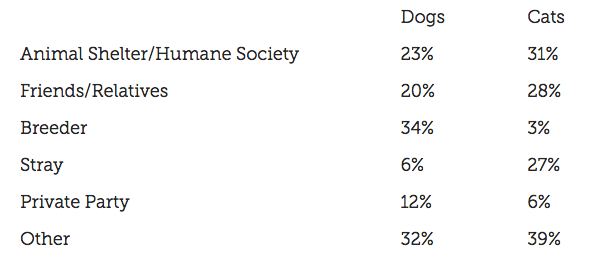
LiveScience posted “A Blueprint for Ending the Euthanasia of Healthy Animals.”
Do you have Kleenex handy? Read “10 Shelter Stories That Will Make you Smile.”
Simply put, if you have it in you to consider pet adoption, your action will probably save the life of a sheltered animal and give it (and you) a second chance!

Additional resources
Do you need more research? Be sure to visit the final link in the bulleted list below, which also has an exhaustive bibliography worth viewing.
- “6 Ways Pets Can Improve Your Health” (WedMD) by Lisa Fields
- “The 10 Health Benefits of Dogs and One Health Risk” (HuffPost) by Kristen Sturt
- “10 Surprising Benefits of Having a Dog…” (LifeHack) by Amy Morin
- “About Pets and People” (Centers for Disease Control)
- The Benefits of Pets – How the Human – Animal Bond Is Evolving (Bayer)
- “Having a Dog Can Help Your Heart – Literally” (Harvard Health Publishing)
- Health Benefits of Furry Family Members (BlueBuffalo)
- “How to Choose a Pet” (Parenting) by Barbara Rowley
- “Life-Changing Power of Pets” (Psychology Today) by Sanjiv Chopra and Gina Vild
 “Selecting a Pet Dog” (AVMA)
- “Selecting a Pet for Your Family” (AVMA)
- “Ten Health Benefits of Owning a Pet” (Women’s Day) by Alexandra Gekas
- “Top 5 Health Benefits of Owning a Pet” (AnimalPlanet) by Sarah G. McCandless
- “The Benefits of Pets for Human Health” (National Center for Health Research) by
CODA: The “‘last words” as a recap and a final website for you to check out:
Studies have shown that owning a pet can be physically and mentally beneficial for people of all ages. In the case of senior citizens, just 15 minutes bonding with an animal sets off a chemical chain reaction in the brain, lowering levels of the fight-or-flight hormone, cortisol, and increasing production of the feel-good hormone serotonin. The result: heart rate, blood pressure and stress levels immediately drop. Over the long term, pet and human interactions can lower cholesterol levels, fight depression and may even help protect against heart disease and stroke.
But, you knew all about this, right? So, what are you waiting for?
For me, I gotta go… and take Gracie and Brewster out for another walk!
Have a Happy PET Valentine’s Day!
PKF

© 2019 Paul K. Fox

Besides the numerous pictures of Gracie and Brewster, photo credits in order from Pixabay.com: “puppies” by kko699, “dog” by GDJ, “people” by Herney, “animals” by Gellinger, “dog” by kandykandoo, “dog” by maja7777, “walking” by mohamed_hassan, “dog” by haidi2002, “pit-bull” by RescueWarrior, “dog” by groesswang, “kitten” by creades, “pretty-girl” by TerriC, and “dog” by Leunert,


 Supported by Dan Ariely and his team at Timeful (a company acquired by Google), Srinivas Rao writes at
  Easy to set-up
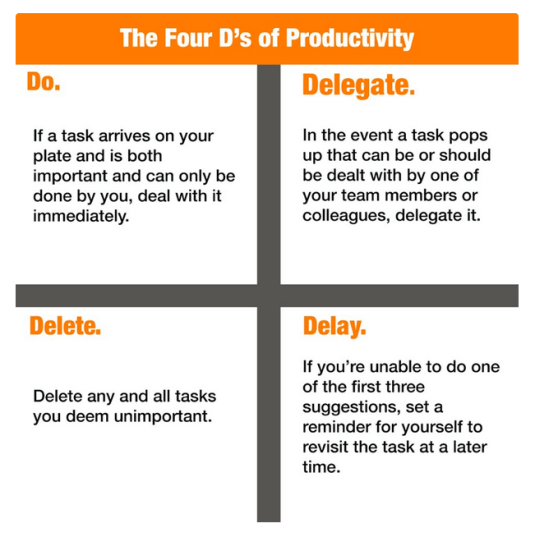
 As musicians and music teachers, this suggestion may hit home: Do something that stimulates your “right brain” with acts of personal self-expression or artistry every day, and schedule it both intentionally and early!
 developing innovations, trends, and movements in their field, and embrace better instructional techniques and use of media for their students!
 The answer is… probably not.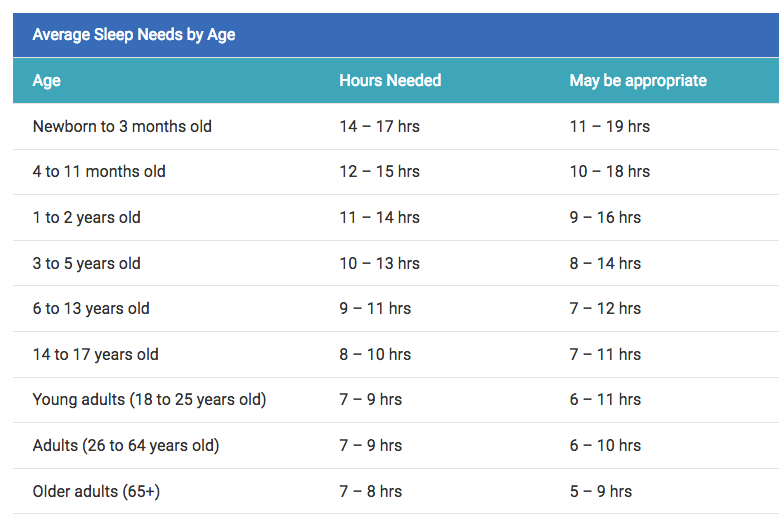
 I remember when I taught full-time and was in the middle of a full-blown musical production, I sometimes laid awake feeling “stirred up” inside trying to think of all the things I needed to do the next day. #5 of Brittney’s list is solved by putting a legal pad and a good pen by your bed stand, and without awakening your spouse, roll over and jot down a few of your “don’t forgets.” Or if you prefer to use the magic of technology, you can do this digitally… take a minute or so and use your tablet or smartphone, but don’t stay up very long and let the screen’s blue-light make your insomnia worse. Revisit title heading #2 above for note-taking apps.
 “Much like Gilligan and his infamous “three hour tour,” what I thought might be a quick clean-out extravaganza turned into an epic, six-month journey through the nether reaches of my closets and my psyche. Along the way, I learned many things from Maeve about organization — and more than a few things about myself that changed my relationship with my stuff.”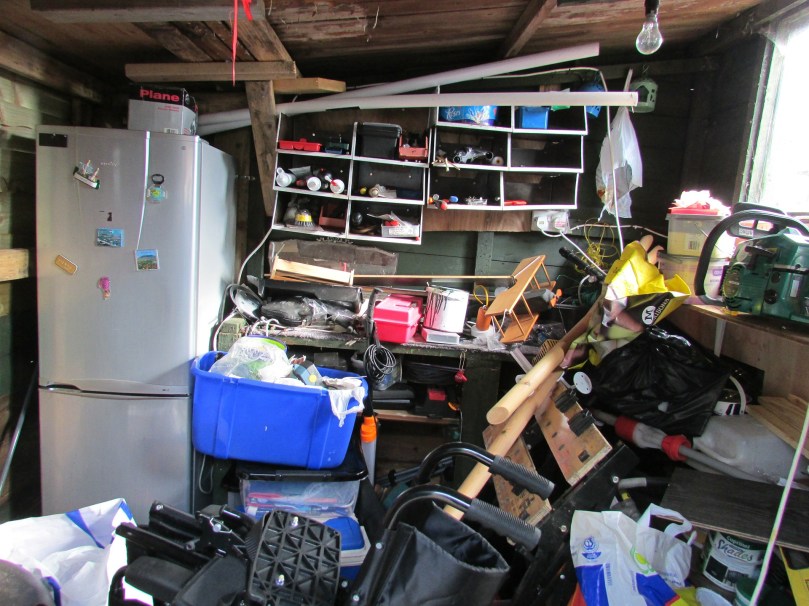









 (Getting a little revenge? On trip #6, when we hooked up to the Apple Store’s computer, our Time Capsule crashed their hardware.) With all of my wife’s documents long-gone from the computer and a couple terabytes of data on the Time Capsule now inaccessible, we were “saved” by our subscription to the cloud-based backup program Carbonite which did restore most of her files… but took five days 24/7 via WIFI to bring them back!
 One way to help educate yourself on all of these 21st Century “innovations” is to watch the podcast
  The original saved document is considered Copy #1. You need to then transfer this to an external location, outside your hard drive. Copy #2 could be sent to a flash or jump drive (just plug it into your USB port), or an external hard drive. (Understandably, my wife is no longer willing to trust the Apple Time Capsule which uses a program called Time Machine that automatically backups every file you save via WIFI… but there are other brands you could consider.)
 From password management to virus protection, and simply knowing not to click on any random link or attachment in email are essential. Online security has become a very important issue. The experts tell us we should not have the same password for all of our applications, and it should not have any portion of our name, phone number, or other easy-to-guess info. My solution to resolve the conundrum of being safe and catering to a “senior citizen’s memory” was to create a core password that I could remember but no one else could figure out, and then add a prefix or suffix of a couple additional letters that describes the name of the applications. (Whatever you do, don’t use “123” as a password!) You should write down on paper an alphabetical listing of your user names and passwords, store the journal in your safety deposit box away from fire, flood, or theft, and share another copy of it with your spouse or at least one other family member. But, don’t forget to update the catalog frequently! (Passwords should change from time to time.)
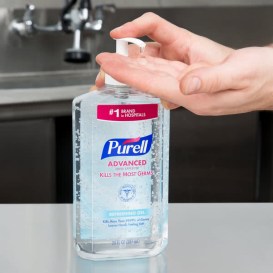 for your eye glasses to avoid scratching the lenses?








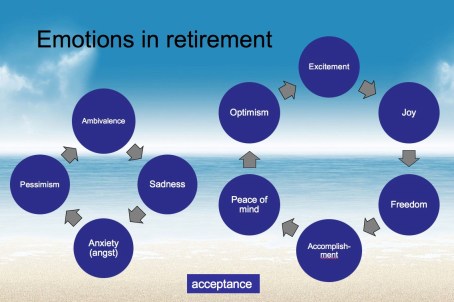




 that seem to be the most prevalent:
















 The “mission” is to help you with the transition to retirement and, when they are relevant, to communicate links to helpful sources of information. Many of these are not applicable to every retiring music teacher. However, if not issues for a family member, you might know of a friend, neighbor, colleague, or someone else who could use some direction in these eclectic topics:
 Several great examples, his set of
 Home Services
 Sleep disorders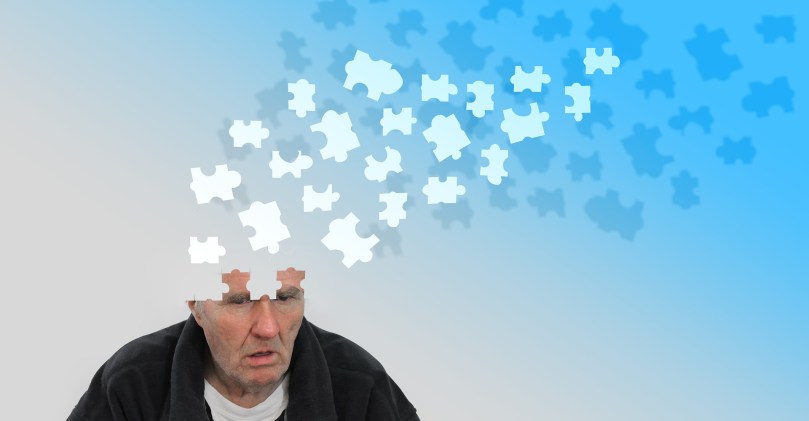
 Finally, out of the blue, Jennifer Scott contacted me with “healthy ways to cope with a loss” with these resources to help grieving families:


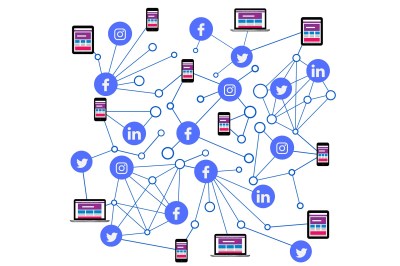
 When MySpace and Facebook came upon the scene in 2003 and 2004, most school administrators recommended “stay away from these.” The online sharing and archiving of photos initiated the adoption of many other social media apps (Flickr and later Instagram, Tumblr, Snapchat, etc), which provoked new challenges in maintaining privacy, appropriateness, and professionalism. Danger, danger, danger!
 Communicating digitally or electronically with students may lead to the blurring of appropriate teacher-student boundaries and create additional challenges to maintaining and protecting confidentiality.
 www.gmajormusictheory.org
 Pennsylvania State Education Association (PSEA):
  posts with your school’s location.

 I hate the Pennsylvania Turnpike… but I’ll get over it!
 Soon I will be attending my 51st PMEA conference (counting springs and summers). I always feel a little nostalgic this time a year when I recollect all of those PMEA District, Region State, and All-State festivals, the latter held in conjunction with the music educators conference. I’m also remembering all the times I took my students to these events, capturing memories of specific individuals, singing in their choral parts in the car, swapping old stories about previous orchestras, choirs, and conductors, and providing a few last-minute tips on how to take auditions.
 privilege of keeping “in tune” with fellow retirees, active practitioners, and even members of our PCMEA pre-service music teachers. This has stimulated my mind, kept me current, made me a better listener, and fostered a lot of moments of satisfaction knowing that I can still help dedicated professionals in the career that I devoted most of my life.

 paulfox.blog