

When Your Car (or Smartphone or Computer or Soundbar) is Smarter Than You
Okay, I know I am not a “technology native,” but at least I have become more savvy as a well-informed “technology immigrant.” (Just don’t tell Donald Trump!) But, I just can’t seem to keep up! What is it about “our generation” missing that part of the brain that somehow intuitively informs us which link or button to push in a long series of options on a menu bar? (The ones that only have symbols or pictures really puzzle me!)
I bought a new Chevy (a used but current-model-year demo from the dealer), and I am struggling to understand it! Oh, not just the basics of the radio, three-zone HVAC system, cruise control, or all of the other nifty buttons on the steering wheel…

But, this car talks to me. It tells me when I am not driving straight within the lane. It reprimands me when I am following too close to the car in front of me. In case I forgot to notice the speed limit sign, the reminder pops up next to the speedometer. It even tells me to stop reading the dashboard while I am driving (which is somewhat ironic since the notice comes up randomly while my car is moving).
Our devices are all becoming more interconnected and even “seamless!” For example, my GM vehicle offers OnStar, turn-by-turn navigation, and Sirius/XM-Radio. When I plug my iPhone into the special interface next to the cigarette lighter, the home screen shows up on the main window of my car, making it a cinch to play music from my iTunes library!
If I need to hear female voices “tell me where to go” (besides my wife, of course), I have the opportunity of either letting Siri give me the street directions or listen to another digital woman (who or where she comes from I do not know – a Google Maps cyborg?). One trip, I turned them both on. Number 2 came through the car speakers, while Siri spoke through the phone itself. They both nearly simultaneously gave me the wrong directions to Hershey Lodge (Harrisburg), having me exit the PA Turnpike two exits too soon. (Go figure. I should have taken the advice of my wife who said, “Harrisburg East.”)
This “trouble in tech paradise” is not limited to automobiles. Every appliance is becoming smarter than me! Here’s another example that I may have bought “too many toys” for my own good. Both my Samsung TV and soundbar seem to automatically update themselves using my household WIFI network. The funniest moment in my installation of the Bose sound equipment connected to our cable box in the living room was when I downloaded their app for my iPhone, and inadvertently turned on from a remote location a streaming country music service blaring throughout my house. (Scared my wife to death!)

This is an “equal opportunity” rant, and I do not discriminate: Apple vs. Windows OS, Apple vs. Android iOS, or Apple Genius vs. Best Buy Geek Squad. It makes little difference… embracing the tools of “new age” media and scientific innovations are complicated! For example, why does one need to have a PhD in computer science to use Mail Merge and print labels from Excel and Word on either platform? It should never be that hard to prepare your Christmas card mailing list!
Nearly the only time my “marital bliss” with my wife has been challenged is when something BAD happens to a file, app, or program on our iPhone, iPad, or Mac computer… and we try (with loads of mistakes) to fix it “together.” Even the dogs know to stay away from technology when we are in the middle of a hardware or software “bug!”
Your worst fear – a “crashing” computer
It’s hard to know who to trust in this technology-overloaded environment. Several weeks ago, when my wife’s Mac crashed and was “trapped” in an endless loop of restarts, we picked up our entire 27-inch, awkward-shaped/sized piece of equipment and carried it to the Apple Store for a consult with the “Almighty Apple Genius Department.” We brought with us the printed error message that said the problem was due to a “kernel panic.” Placing our faith in AppleCare, we accepted their experts’ prognosis, and allowed them to erase half-a-million documents from her hard drive, strip it clean, and re-install the operating system. Big problem, but an even bigger mistake.

Here’s the short version of our sad story (the retelling of which raises my blood pressure). After seven trips to the mall over five days, “they” (who are supposed to know better) discovered that our backup external hard drive, the Apple Time Capsule bought 18 months ago (now out-of-warranty, but of course!), was the source of the problem, not the Mac.  (Getting a little revenge? On trip #6, when we hooked up to the Apple Store’s computer, our Time Capsule crashed their hardware.) With all of my wife’s documents long-gone from the computer and a couple terabytes of data on the Time Capsule now inaccessible, we were “saved” by our subscription to the cloud-based backup program Carbonite which did restore most of her files… but took five days 24/7 via WIFI to bring them back!
However, we “learned” that this process is excruciating slow if you have a stray colon or backslash within the title of any document. Many of these files had to be reloaded by hand. And, to date, we still have not been able to get our Family Tree application to work!
Morale to the story: Don’t always believe in the “geniuses!”
Don’t give up on your existing tech skills
Regardless of our age, many of us music teachers are a little more fortunate to have been exposed to innovative software and other technological tools during our teaching years.
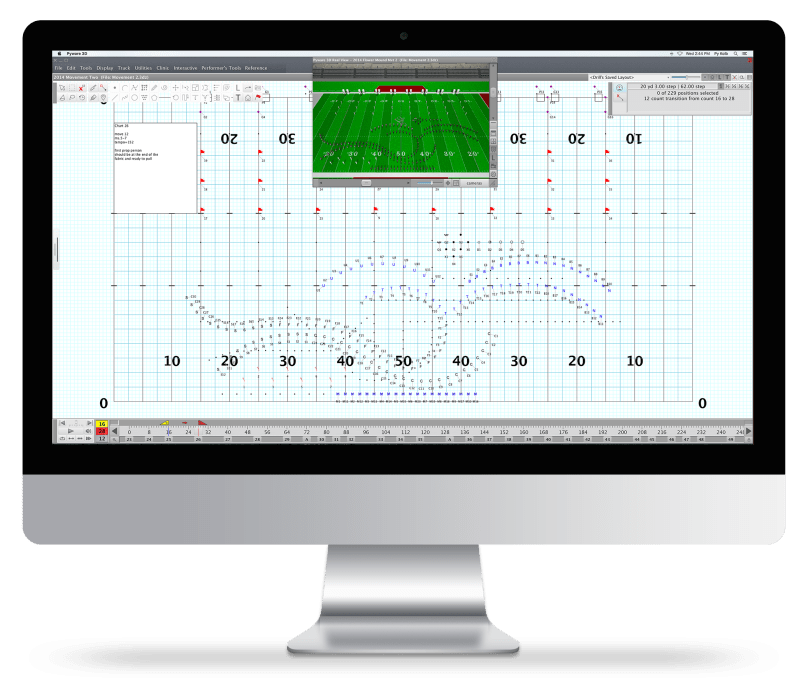
If you were a band director, you might know Pyware 3D Drill Design or some of the video editing programs to compare your the halftime show on Friday night with the schematic drawings “count by count” on how it should look. If you were involved in printing programs, senior yearbooks, posters, or other graphic media, you’re probably not afraid of desktop publishing projects. Those versed in Sibelius, Finale, or other music creation programs, or who introduced MusicFirst or SmartMusic applications to your music students, are much further along than many of the other teachers from our generation. If you’re retiring or have retired in the last five or 10 years, you were probably trained in your school district’s proprietary grade-book programs or attendance record system, and even may call yourself well-versed on creating/posting material on a website like “teacher pages,” skills that can be easily transferred to applications like WordPress or Wicks.com. So, don’t be afraid to venture out of your “comfort zone!” Unlike your father or father-in-law, who may have only had a taste of Applesoft Basic programming or a little TurboPascal coding before they retired, you may be “ahead of the game!”
Here are a few more gleams of “tech illuminations” that I have learned from being baptized and then thrown into this 21st-century topsy-turvy madhouse.
Turn yourself into a “tech-streetwise” retiree
 One way to help educate yourself on all of these 21st Century “innovations” is to watch the podcast “Leo the Tech Guy” at https://techguylabs.com/. Leo Laporte brings all of this confusion down to our level… simple/easy terms and step-by-step instructions, and his reviews on future computers, smartphones, tablets, televisions, home security, software applications, and other technology are excellent. His FREE talk show airs every Saturday and Sunday from 11 a.m. – 2 p.m. Pacific Time, but all of the episodes are archived and you can search on specific topics.
The subjects he returns to on a frequent basis include:
- Backup and Recovery
- Business
- Gaming
- Hardware
- Home Theater
- Internet and The Web
- Media
- Mobile Phones
- Networking
- Peripherals
Backup the backup
Leo says we should have at least three copies of every important file… one on our hard drive, one on an external drive, and one in the cloud. If you don’t believe this, reread the agonizing anecdote above (“…crashing computer”). Backup #1 was erase by Apple Genius. Backup #2 was damaged or made inaccessible by the “kernel panic.” That left us with Backup #3… Carbonite. Thank god!
 The original saved document is considered Copy #1. You need to then transfer this to an external location, outside your hard drive. Copy #2 could be sent to a flash or jump drive (just plug it into your USB port), or an external hard drive. (Understandably, my wife is no longer willing to trust the Apple Time Capsule which uses a program called Time Machine that automatically backups every file you save via WIFI… but there are other brands you could consider.)
However, keep in mind that if a fire occurs in the room you store your computer and external hard drive, all could be lost! The final copy #3 should be the automatic online back-up created by a cloud-based application. Carbonite saved my ***, but there are many subscription services out there that offer file syncing, encrypted backup, and data restoration at a reasonable cost:
- Acronis True Image
- Backblaze
- Carbonite
- IDrive
- SOS Online Backup
- SpiderOak One
What is the core reason that all of this is worth the money? Cloud-based programs do their magic behind-the-scenes (automatic redundancy saves the day) and won’t let you you forget to backup! If you are looking for an assessment like Consumer Reports on these products, advisers say, “Go to a computer nerd!” Perhaps PC Magazine comes the closest in being comprehensive: https://www.pcmag.com/article2/0,2817,2288745,00.asp.
Manage passwords carefully.
 From password management to virus protection, and simply knowing not to click on any random link or attachment in email are essential. Online security has become a very important issue. The experts tell us we should not have the same password for all of our applications, and it should not have any portion of our name, phone number, or other easy-to-guess info. My solution to resolve the conundrum of being safe and catering to a “senior citizen’s memory” was to create a core password that I could remember but no one else could figure out, and then add a prefix or suffix of a couple additional letters that describes the name of the applications. (Whatever you do, don’t use “123” as a password!) You should write down on paper an alphabetical listing of your user names and passwords, store the journal in your safety deposit box away from fire, flood, or theft, and share another copy of it with your spouse or at least one other family member. But, don’t forget to update the catalog frequently! (Passwords should change from time to time.)
I also found there are several ingenuous apps out there to help you with creating really random passwords, storing and accessing them with one “master password,” and even the provision of a “digital will,” designating a trusted friend and family member access to your virtual password vault in the event of an emergency or crisis. Now, all that is left for you is figuring out how to download one of these on all of your devices:
- LastPass (my favorite)
- Keeper Password Manager
- DashLane
- Sticky Password
- Password Boss
- RoboForm
- True Key, etc.
Again, an analysis courtesy of PC Magazine provides additional insight: https://www.pcmag.com/article2/0,2817,2407168,00.asp.
Sanitize your smart devices.
They used to say that a tie is one of the most germ-ridden articles of men’s clothing. (In some hospitals, they recommend that doctors “lose the tie” as part of their dress code.) What do you see at the entrance of most grocery stores… disinfectant wipes for the shopping cart handles? Perhaps your cellphone tops the list of tech articles you rarely sterilize. When was the last time you cleaned your tablet? Your door knob to the bathroom probably gets more attention! Can you imagine anything containing more bacteria than the surface of your computer’s keyboard?
Whatever you do, be careful not to immerse your tech tool and cause harm to the internal circuits! Even if they say your phone is “water resistant,” don’t test it!
There are a lot of products out there to help you kill the microbes… specialized wipes for touch screens and others for hard surface areas. Read the precautions. What do you use  for your eye glasses to avoid scratching the lenses?
Be aware of “operator error” in making this worse. How often do you wash your hands prior to picking up your wallet or smartphone? PURELL Hand Sanitizer was invented in 1988 by GOJO to meet the needs of healthcare providers and restaurants operators looking for ways to reduce the spread of germs. I have a container of PURELL sitting next to my computer.
Merry Maids offer these tips on cleaning your electronic devices: https://www.merrymaids.com/blog/quick-tips/clean-and-disinfect-electronic-devices/.
I also liked Design Mom’s “Eleven Secrets to Cleaning your Tech” at https://www.designmom.com/living-well-11-secrets-to-cleaning-your-tech-devices/.
Again, read their advice and all warnings. For a low budget solution, I would look into buying an antibacterial micro-fiber cloth and for the keyboards, consider using a very light application of isopropyl alcohol (on a rag, not directly on the device!).
Speaking of sanitizing… clear your “cookies” and “cache!”
What a strange language we use for our tech tools! Well, in the middle of writing this blog, I found that my Firefox browser was “giving me fits” for doing an online credit card transaction. Taking time out to find out why there were error messages (calling the 1-800 customer support people), I confirmed they always seem to ask you three questions:
- What is the make, model, and year of your computer (or other device)?
- What is the version of your computer’s operating system? (Mine is almost always updated to the most current edition. This is normally good advice for surviving the always-fluctuating tech landscape.)
- What browser are you using?
For some reason, the techies will recommend you clear your browser history, including all forms, downloads, cookies, and cache… “translate” this mumble-jumble as cleaning out some of the temporary files and other “things in the buffer.” If you are having trouble reaching a known website or filling out digital applications or other forms, give this a try. It works for me almost every time. When in doubt, sanitize!

When you’re in real trouble, be quick to reach-out for support
Remember that game show, “Who Wants to Be a Millionaire?” In the original series, one of the “lifelines” to help the “stumped” contestant deal with a difficult question was the option to “phone a friend.” Latch onto a “technician tutor,” perhaps a student graduate or close family member. With how fast technology is evolving, I have been so appreciative of a former student stage crew member who came back to the school district employed as a tech aide, and was willing to do “house calls” and set up and improve the overall security of my network, install multiple routers, computers, printers, smart TVs, etc.
What about becoming a “web(inar) maestro?”
Finally, have you considered making an education video or presenting a webinar? Do you think you, another “technology immigrant” and retired music teacher (like me) would be the last one to ever venture out to do this? Well, perhaps not!
Think of all of that expert “stuff” you have swimming around your head. Pass it on… it’s all about leaving a legacy. You should share your experiences and knowledge earned from that old “school of hard-knocks!”
And, it isn’t that hard to do. If you are comfortable with PowerPoint, Keynote, or Prezi, all you need to do is find someone who has a subscription of Zoom or Go-To Meeting. If you are a member of a state education association like NAfME or an affiliated state unit like PMEA, they could set you up to host a webinar or record a professional development video. It’s “easy peasy!” Most would welcome your contribution to their online professional development library, like the NAfME Academy.
You might even have a few ready-made presentations sitting idle on your hard drive. What about those old music appreciation lessons, marching band leadership seminars, Orff/Kodaly/Dalcroze workshops, string pedagogy tips, or ??? Dust them off, review/edit/update, or as they say, “repackage” your work. What’s that quote? “A mind is a terrible thing to waste.”

This started out as a “rant” lamenting the fact we have all but lost what seemed to be a calmer, simpler lifestyle. But, technology is here to stay, and we either learn to cope with it, or go back to the caveman era and put our heads in the sand (to mix metaphors). At least, be happy to know you are not alone in riding this “bucking bronco” of the digital age. Here are even more online hints on surviving technology:
- Five Tips on Surviving the New Technology in Your House
- How to Survive the Next Wave of Technology Extinction
- Beware of the Smart Toaster: 18 Tips for Surviving the Surveillance Age
- How to Survive New Age Tech-Consequences
P.S. My wife says she’s still mad at Apple! Well, we do have to move on… a little wiser, more resilient, and possibly less gullible in trusting future “experts.”
PKF
© 2018 Paul K. Fox
Photo credits in order from Pixabay.com: “banner” by geralt, “imac-ipad-iphone-macbook-laptop” by Tim_H, “computer problem” by OpenClipart-Vectors, “man” by Tikwa, “thumb-drive” by skeeze, “key” by 3Dman_eu, “maze” by qimono, and “smartphone manipulation” by Funky Focus.


 When MySpace and Facebook came upon the scene in 2003 and 2004, most school administrators recommended “stay away from these.” The online sharing and archiving of photos initiated the adoption of many other social media apps (Flickr and later Instagram, Tumblr, Snapchat, etc), which provoked new challenges in maintaining privacy, appropriateness, and professionalism. Danger, danger, danger!
 Communicating digitally or electronically with students may lead to the blurring of appropriate teacher-student boundaries and create additional challenges to maintaining and protecting confidentiality.
 www.gmajormusictheory.org
 Pennsylvania State Education Association (PSEA):
  posts with your school’s location.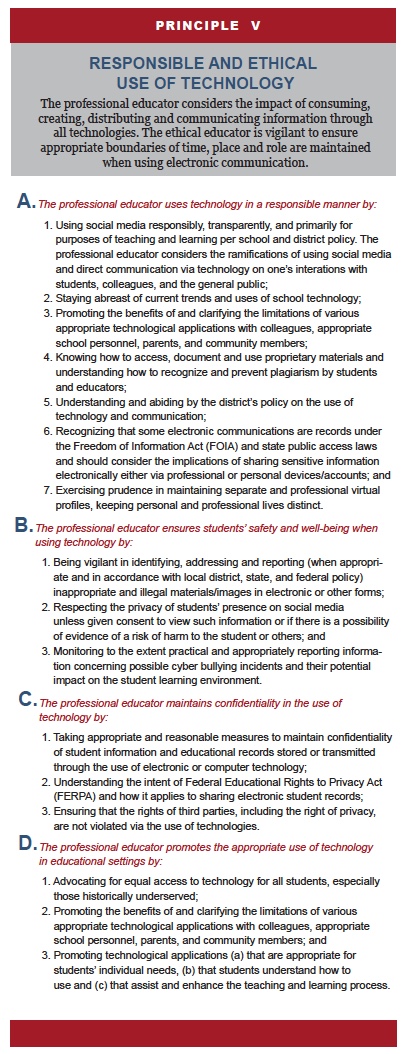



 musical or athletic events, coaching or working with children in a coaching capacity, as a leader and role model.”
 If you can afford it, purchasing a simple domain name like your first and last name (something easy to remember) would be a great idea. Prospective employers will not have to write down a bunch of numbers, know your birthday, learn your nickname, etc. to find your e-portfolio. If you have an unique middle name or surname, you might luck out and be able to snag (and register) the perfect domain name. This was not possible for me! Do you know how many Paul Fox’s (even Paul K. Fox) are “out there” already taken?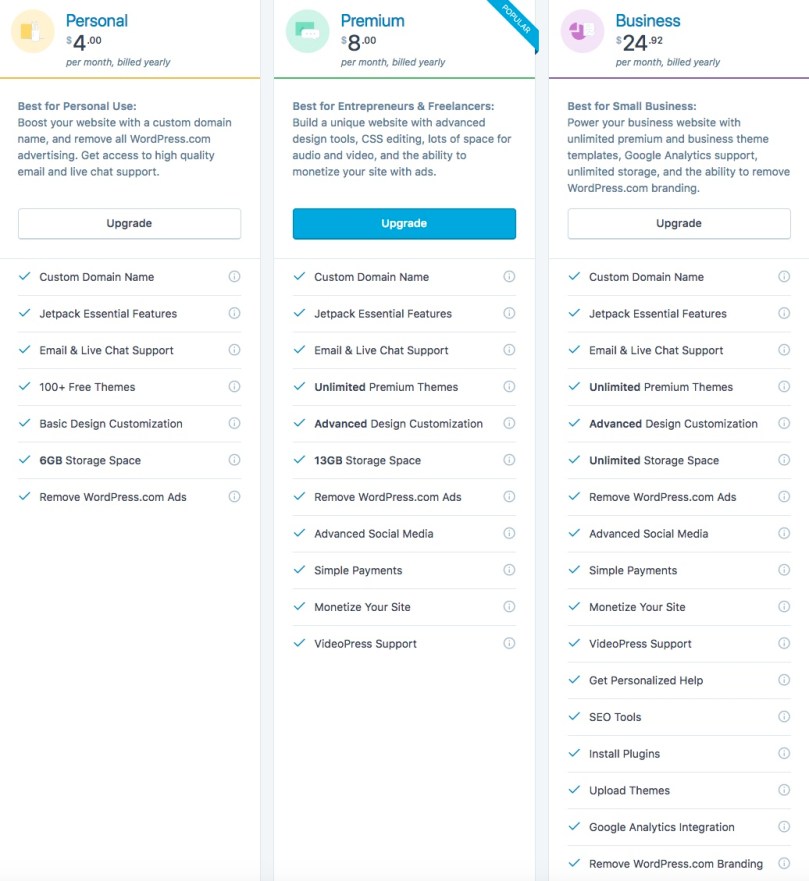
 To create your web site’s identity, WordPress will remove the dots and add their company’s moniker “.wordpress.com” at the end of your email name. That is how
 Showing your versatility, try to assemble a collection of still photos, audio examples, and videos that ideally represent all specialties in music education: choral, dance, general music, concert band and string instrumental, marching band, jazz, theater, etc., and demonstrate your proficiency in multiple settings at all grade levels.







 is the most essential “tech tool” to maintain your “now busier than ever” daily/weekly plan.
 r as changing my passwords. Everyone knows, with hackers lurking around every corner of the Internet, you are supposed to do two things: have a different password for each application, and from time to time, change these passwords. They should not be something someone else could guess, like “1234” or your phone number or the nickname “foxy” for me. A “good” password should utilize numbers, capitalized letters and small-case, and special characters like $, &, or underline. Using a password manager program like
  Girls three-part movie or The Crown (Netflix), all I have to do is go into another room, fire up my computer’s browser, and check out the latest video podcast of
  One of my hobbies furthest from a career in music education has to do with collecting and reading books about World War II, particularly U.S. Navy, submarines and surface fleet. One of my fellow hospital volunteer escorts, a veteran of the Vietnam war, turned me on to the free classic online episodes of T.V. series The Silent Service, for example the 25-minute 1957 broadcast of
 Powered by artificial intelligence, other voice-activated virtual assistants and knowledge navigators including products like Google Home and Amazon Echo (with a different “girlfriend” named “Alexa”) are flooding the market. This should be no surprise… the 21st Century seems to be developing many new inventions of super-automation, not so far from the female-voiced computer interface on the USS Enterprise (Star Trek) that could control everything. Soon you may take a ride from Uber in a driver-less car or “program” the autopilot on your pure-electric Tesla. Do you foresee the time when you will accept your Amazon merchandise or pizza being delivered from the air? What were those drone-operated lights we saw in the background of Lady Gaga’s halftime performance at the 2017 Super Bowl… possible future special effects for HS musicals and marching band shows?
 paulfox.blog